Custom apparel businesses need printing equipment that balances image quality, production flexibility, and operating costs. From independent T-shirt studios to commercial garment decorators, choosing between desktop and industrial direct-to-garment (DTG) systems can shape daily productivity and future growth. When evaluating DTG printers for sale, buyers should consider order volume, available workspace, labor requirements, and garment variety rather than selecting equipment based on size or purchase price alone.
Desktop and Industrial DTG Printers Serve Different Needs
Desktop DTG printers are generally suited to startups, small print shops, and businesses producing personalized garments in limited quantities. Their compact footprint can simplify installation where workspace is restricted. They are particularly useful for testing designs, fulfilling small orders, and producing customized items without extensive production infrastructure.
Industrial DTG systems are designed for more demanding workflows. Depending on their configuration, they may offer multiple printheads, larger working areas, automated functions, or multiple garment stations. These capabilities can help established decorators manage recurring orders and reduce production bottlenecks.
The distinction is not simply about machine size. A suitable system must match the business’s daily workload, product range, staffing, and growth expectations. A desktop model can be commercially effective for a small operation, while an industrial machine may be unnecessarily expensive when order demand remains low.
Compare Production Efficiency and Workflow Design
Printing speed is an important purchasing consideration, but rated speed alone does not determine how many garments a business can ship each day. Loading, unloading, pretreatment, curing, maintenance, and artwork preparation also consume production time.
Desktop systems may require more manual handling between individual jobs. Industrial machines can reduce some of this workload through automation, multiple working stations, and integrated processing functions. Buyers should compare complete workflows rather than relying exclusively on advertised printing speeds.
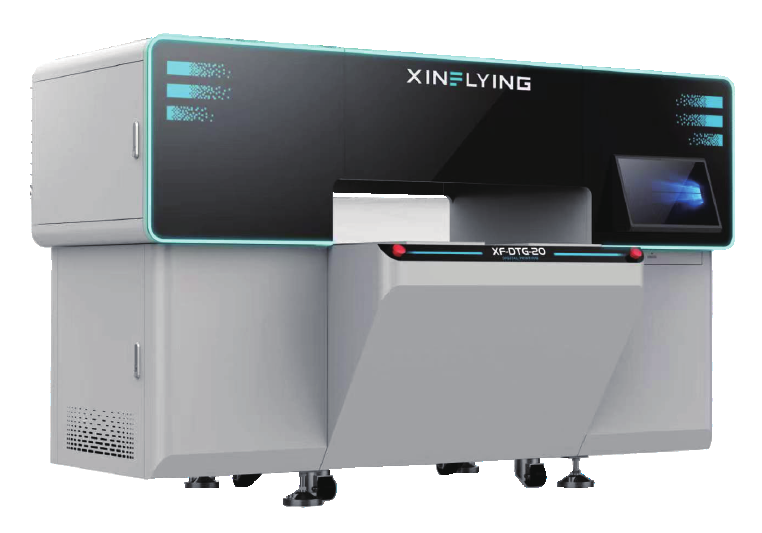
For businesses seeking a more integrated approach, Xinflying offers the XF-DTG-20-2I16A1+4I32A1 direct-to-garment printer. Its design combines pretreatment and printing in one machine, reducing the need to manage these processes as separate equipment stages.
The system also features a double-suction design and a quick-detachable worktable for switching between different printing formats. These features can be useful for decorators handling varied garment sizes and frequent job changes.
Print Quality and Garment Compatibility Matter
DTG printing applies textile ink directly to garments, making it suitable for detailed artwork, multicolor graphics, photographs, and personalized designs. However, the final result depends on more than printhead technology. Fabric composition, garment color, pretreatment, ink compatibility, and curing conditions all affect appearance and durability.
Desktop printers can produce professional-quality results when correctly configured and maintained. Industrial systems may provide advantages in production consistency when their printhead configurations, ink-management features, and workflow are appropriate for the workload.
According to Xinflying’s published product information, the XF-DTG-20-2I16A1+4I32A1 uses two Epson i1600-A1 printheads and four Epson i3200-A1 printheads. This configuration supports detailed garment graphics and commercial printing applications.
Before purchasing, businesses should request sample prints on their intended fabrics, including light and dark garments. Testing should cover color reproduction, fine details, hand feel, and wash durability under appropriate care conditions.
Calculate Total Ownership Costs, Not Just Purchase Price
The initial equipment quotation is only one part of the investment. DTG businesses must also budget for textile inks, pretreatment liquid, cleaning supplies, curing equipment, replacement components, labor, and routine maintenance.
Desktop equipment may require a smaller initial investment, making it attractive to businesses entering garment decoration. Industrial systems may involve higher upfront costs, additional space requirements, and greater operating expenses. However, greater production capacity can become valuable when sufficient orders exist to use it.
A useful comparison divides total operating expenses by the number of saleable garments produced. This reveals how rejected prints, idle time, and manual processing affect unit economics.
When assessing DTG printers for sale, buyers should model costs against realistic monthly demand. Purchasing a larger machine before establishing sufficient sales can tie up capital, while choosing equipment that cannot accommodate recurring orders may limit growth.
Evaluate Maintenance, Training, and Supplier Support
Equipment reliability influences production schedules and customer satisfaction. Printhead cleaning, ink-system care, environmental conditions, and operator procedures all affect long-term performance. Businesses should therefore evaluate maintenance requirements alongside productivity claims.
A capable Xinflying DTG printer manufacturer should provide clear technical specifications, operating guidance, and information about warranty coverage and spare-parts availability. Buyers should confirm the scope of technical support, training options, maintenance procedures, and any additional service charges before placing an order.
For an integrated machine such as the XF-DTG-20-2I16A1+4I32A1, buyers should also clarify how the pretreatment function operates, which garment formats are supported, and what additional equipment is needed for curing finished prints.
These checks help decorators assess whether a machine fits their existing production environment and whether their team can operate it consistently.
Choose Equipment That Matches Business Growth
The best investment depends on the business model. A startup focused on personalized T-shirts may prioritize affordability, compact dimensions, and flexible short-run production. An established decorator supplying retailers or corporate customers may place greater emphasis on throughput, repeatability, and streamlined labor requirements.
A reliable Xinflying DTG printer manufacturer can help buyers compare machine configurations against these operational priorities. However, the final decision should be based on documented specifications, sample testing, a realistic production forecast, and a complete ownership-cost estimate.
Businesses reviewing DTG printers for sale should also consider future product diversification. A system that accommodates different garment formats may provide useful flexibility, provided its capabilities align with the fabrics, dimensions, and order volumes customers actually require.
Make the Right Choice for Modern Garment Decoration
Desktop and industrial DTG printers serve different production needs, and neither category is automatically the better investment. The right choice depends on order volume, workspace, print quality requirements, operating costs, and available support.
For decorators seeking an integrated production workflow, Xinflying’s XF-DTG-20-2I16A1+4I32A1 combines pretreatment and printing, with a quick-detachable worktable for format changes. Comparing its verified specifications with actual business requirements helps buyers make an informed equipment decision and build a more scalable garment-decoration operation.
